Cloud
Hosted by us, or the same containers in yours. Move it without rewriting the product.
Specialized AI workers sit on your org tree — department, section, unit. Work can move between them. A person approves the important steps. Arabic and English.
Run it in our cloud, your cloud, or fully on-prem — air-gapped if that is where the work has to live.
AI conciergeAn AI agent — answers only from our published guide, says “not yet” for roadmap.
The platform ships as containers.
Hosted by us, or the same containers in yours. Move it without rewriting the product.
The containers run inside your network. Images and models stay with you. No outbound path required.
The gateway speaks the OpenAI Chat Completions API. Azure OpenAI and Anthropic work when you point it at them — and so does any other provider that speaks that API. Configure it and it is on. Leave it unset and it stays off.
Agentic Workforce ME is not a chatbot. Not a model you call yourself.
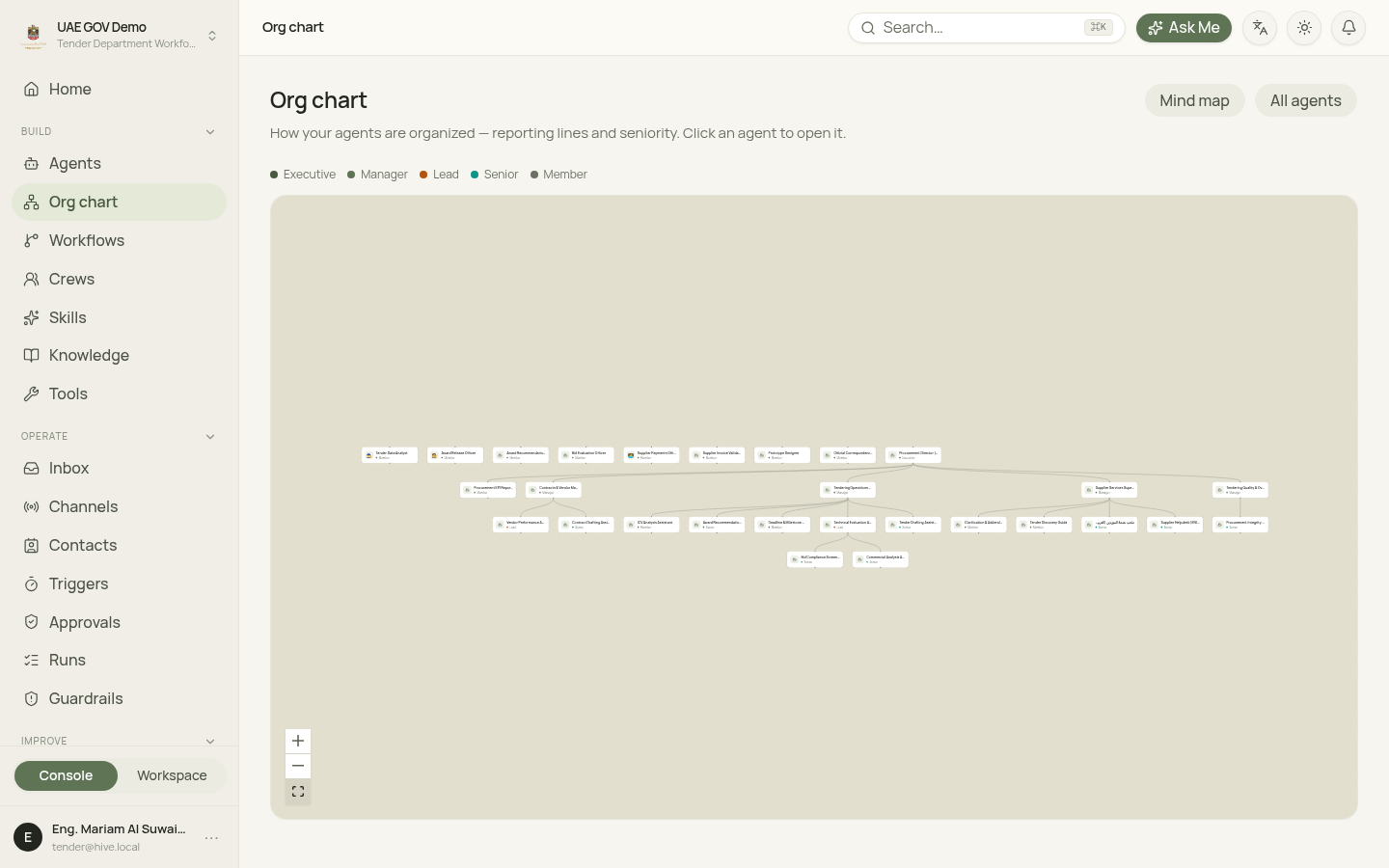
Department, section, unit, then the worker. The org chart shows reporting. Tools, knowledge, and policy flow down the tree. Access is granted per scope, and the most specific grant decides.
Every worker has a reviewable job description: who they are, what they know, and which tools they may use. Published versions do not change under you. What ran is what was published.
Builders open the org chart, the workforce map, tools, skills, jobs, audit, and usage in the Console. Operators pick a worker, keep the thread, and attach files in Workspace — without the admin screens.
Five layers. Follow a request from the person to the record it leaves.
Message in
A message arrives. Same rules on every door.
Org tree + written roles
AI specialists sit on your tree. You set them in the console.
People stay outside this box: they ask, and they approve.
The trust layer
Nothing important leaves without passing here.
Knowledge, tools, and keys — the model does not hold them
Searched, granted, and unlocked only at the moment of use.
A job you can pause and replay
The front door opens a job. Job runners keep it going. The engine can wait for a person.
Connectors reach your systems. Tools are what agents are allowed to do there. Channels are where your people and customers meet the agents. Knowledge sources are what agents read. Automation starts work from events and reports back.
A connector describes an external system the platform can act on: an MCP server, a database, a remote agent or an HTTP API. It is a definition, not a login. To use it, an administrator adds a connection — encrypted credentials with a live health state — and the platform discovers the tools the system exposes. Nothing is callable until a grant allows a specific agent or org unit to use a specific tool, and sensitive tools can be placed behind an approval policy so a named person decides before the call runs.
Example: your ERP behind an MCP server — read tools granted to one unit; the one write tool waits for a named approver.
In the console: Integrations → ConnectorsChannels are the human side of integration. Each channel adapter binds identity, formatting and human-handoff delivery for its medium, then opens the same kind of run the operator opens in the Workspace — so the agent, its tools, its approvals and its trail are identical whatever the entry point. The web widget uses a publishable embed key with an allowed-origin list and optional signed identity; provider channels use the provider’s official API and show an Awaiting first event state until the first message arrives.
Example: a customer writes on WhatsApp; the same agent, tools, approvals and trail a staff member gets in the Workspace.
In the console: Integrations → ChannelsA knowledge source is a system agents read rather than act on: its content is indexed into a knowledge base and searched with citations, with source permissions preserved. Uploads, SharePoint, Confluence, Google Drive, S3 and web pages sync into knowledge bases; agents search them and cite what they used.
Example: the HR policy library on SharePoint — every answer cites the page it came from, and the source’s permissions travel with it.
In the console: Knowledge → a knowledge base → Knowledge sourcesA trigger starts a run from an event or a schedule instead of a person typing — a signed webhook, a cron, a system event. An outbound webhook is how the platform tells your system what happened — run completed, run failed, approval requested — signed and retried.
Example: an invoice lands in your system → a signed trigger starts the review; the decision comes back as a signed webhook your system verifies before it changes state.
In the console: Integrations → AutomationPlain statements. Anything marked Next is roadmap, not a claim.
A handful of steps; nothing goes live until a person publishes.
A connector kind — MCP server, database, remote agent, HTTP API, external agent — or a starter-catalog entry.
Credentials are stored encrypted; the connection is tested and shows its health.
The tools the system exposes are listed; pick only what agents need.
Grant tools to an agent or org unit; write tools carry an approval by default.
A person publishes. What ran is what was granted.
Nothing is callable until a grant allows a specific agent or org unit to use a specific tool. Grants inherit down the org tree; the most specific grant — agent, then unit, section, department, tenant — decides.
An approval policy makes a tool call pause for a named person before it runs. The run waits — across restarts — until they decide.
Every call passes one door: schema check, grant check, approval check, audited execution — credentials decrypted only at that moment, never in a prompt.
Connector kinds, channel setup, triggers and webhooks — with code.
These are pages in the console today. The names match what you click.
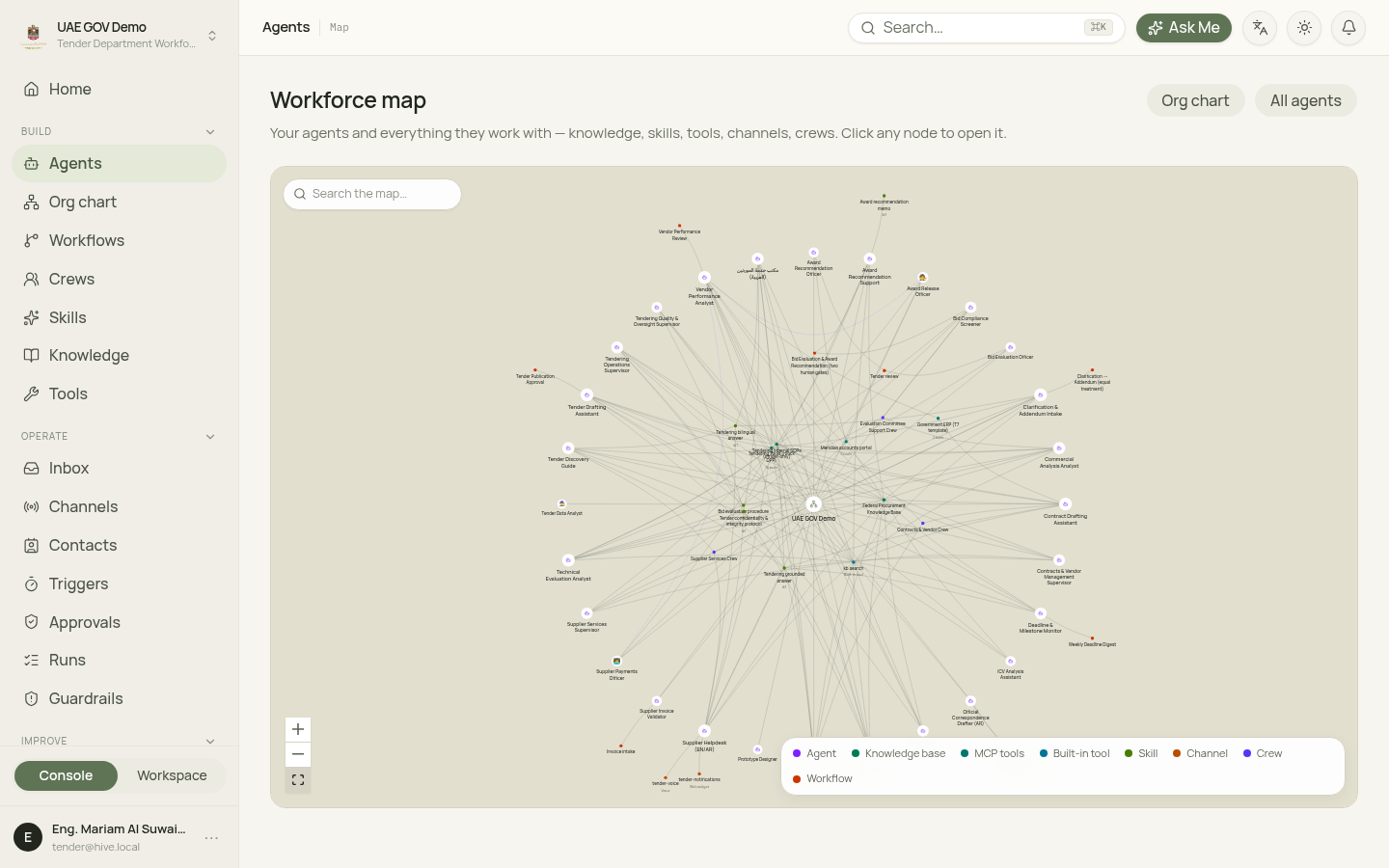
The mind map on Agents. Skills, built-in tools, MCP servers, knowledge bases, crews, and the edges where one agent delegates to another. Each agent also has a Map tab.
Department → section → unit → agent. The Org chart is the reporting view: seniority and who an agent reports to. Grants still inherit down the org tree.
An agent calls agent.delegate and starts a child run on another agent. Crews group agents for a shared job. Remote A2A agents show up as tools when you connect them.
Every run has steps you can replay. Privileged changes and approvals land on the audit log. Usage attributes tokens and cost per tenant, agent, and run.
Built-in tools and connectors go through the tool gateway. Skills are versioned instruction packs. Databases — Postgres, SQL Server, Oracle — are one connector kind beside MCP servers, remote agents and HTTP APIs. Access is the manifest intersected with org grants. Writes pause for a human.
You compose agents, run them, then inspect usage, evals, and memory before you publish again. Learn is lighter than build and operate. The platform does not train a model from conversations.
Compose agents, then place them. Draft faster with prototype builders. Install playbooks from the in-tenant catalog. Orchestrate multi-step work with visual workflows and crews.
In Workspace, pick an agent, narrow tools, and ask for a deliverable. Channels — including email — open the same kind of job. You can open a run after the fact.
Usage attributes tokens and cost per tenant, agent, and run. Eval suites and simulations can block a publish on regression. Agents may keep scoped memory. Improving a worker is a new immutable version — not an automatic fine-tune.
The Console copilot. Ask about agents, runs, and approvals; answers come from your tenant, with links to the right page.
A gallery of published playbooks you can install into a workspace.
Describe an agent or a small UI bundle in natural language. Builds still publish under policy, and privileged build steps can pause for approval.
A preview of the console — workspace, org chart, and workforce map.
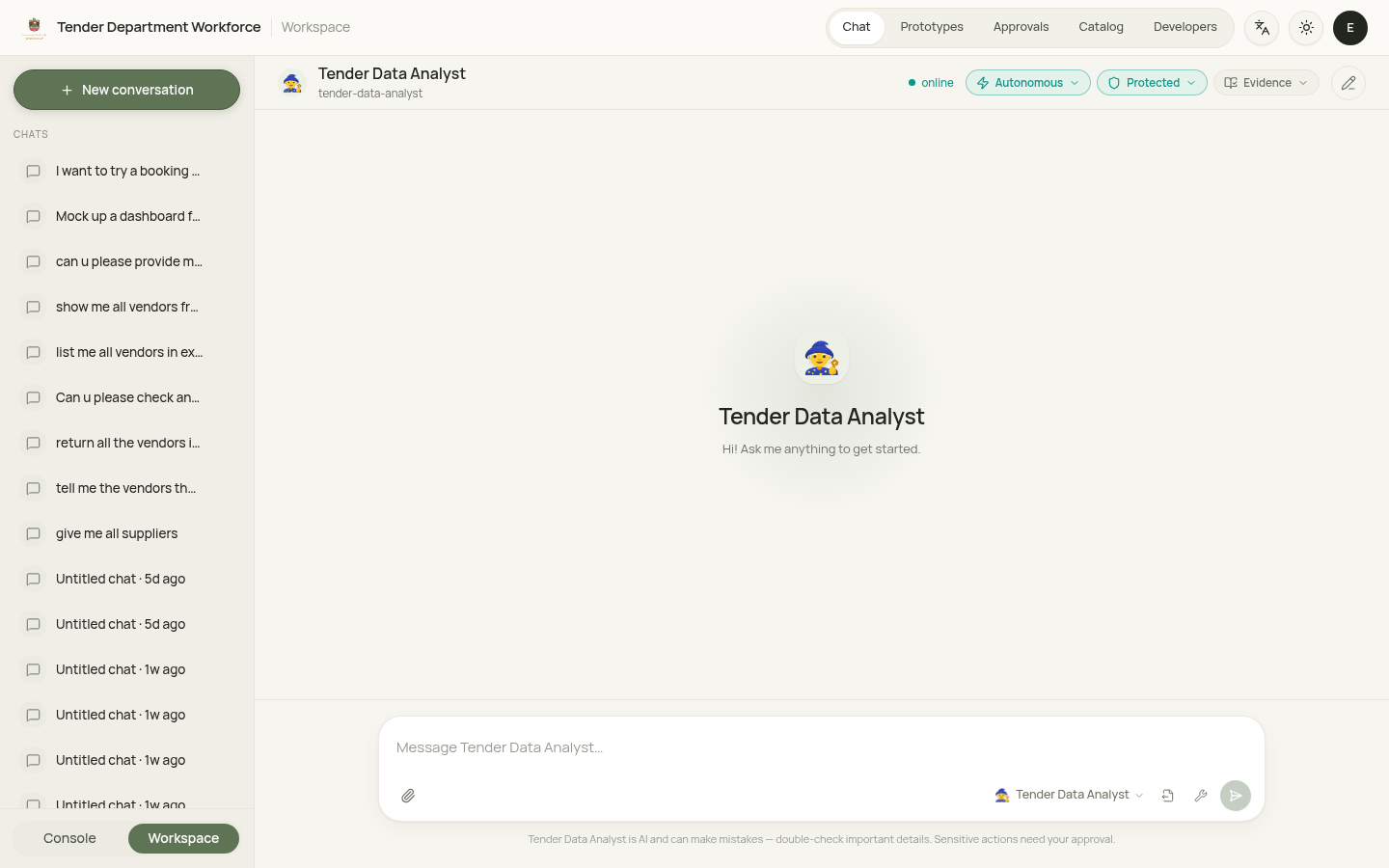
Finance operations, citizen services, and official statistics on one tenancy.
Intake, a validator, and a payment officer. The officer can delegate a vendor check. A human still releases payment when amount or risk requires it.
Arabic-first intake, then a specialist drafts the reply. Each hop is a run you can open.
Analyst, builder, and admin on one tenancy: retrieval, drafting, and a run trail when something privileged happens.
Autonomy is granted, per scope. You can inspect what ran.
Tenant A cannot read tenant B’s data, embeddings, runs, or credentials through the API or through the database role the app uses.
Publish, grants, credential access, and approval decisions are recorded on a tenant-scoped audit log. Runs keep a step-by-step trail.
Gateway credentials are never serialized into prompts, run state, or checkpoints. A prompt leak is treated as a breach-class failure.